

Clear stale open customer deposits in NetSuite using a journal entry. Step-by-step approach to clean up AR without distorting the GL.
Introduction
A common problem in NetSuite is open customer deposits which have not been completely consumed. As an example, suppose you created a customer deposit for a sales order that included a shipping cost but then for some reason the shipping cost was removed on the invoice. As a result, the customer deposit will remain open as it will not be completely consumed. Depending on the situation, it may make sense to create a credit memo, customer refund, or write off the balance. This article will detail how to write off the balance using a journal entry. I will walk you through how to do this manually and then offer a script to automate the process.
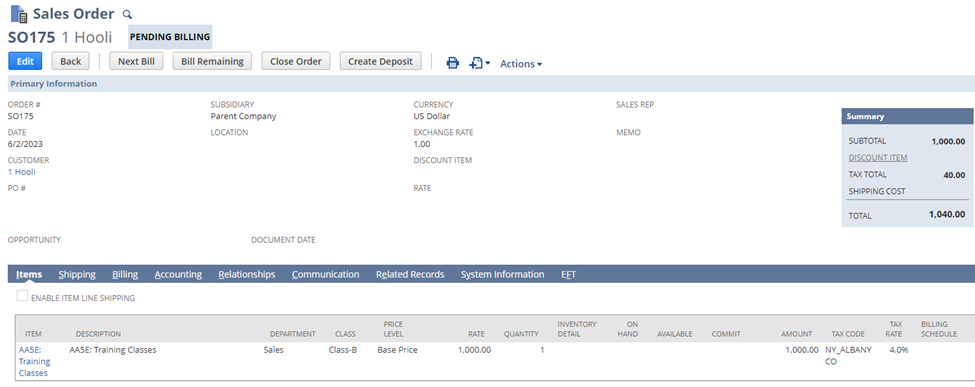
Step 1: Create a Sales Order
Create a test sales order as shown below. For this example, I’m using a service item that does not need to be fulfilled. The total is $1040.00.
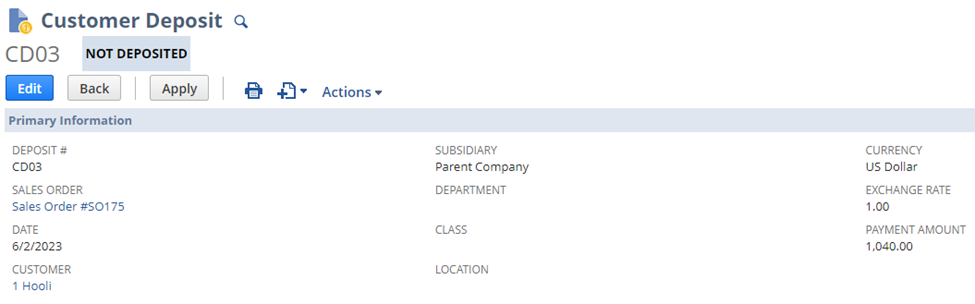
Step 2: Create a Customer Deposit
Click “Create Deposit” and save the record. We now have a customer deposit of $1040.00.
Step 3: Bill the Sales Order
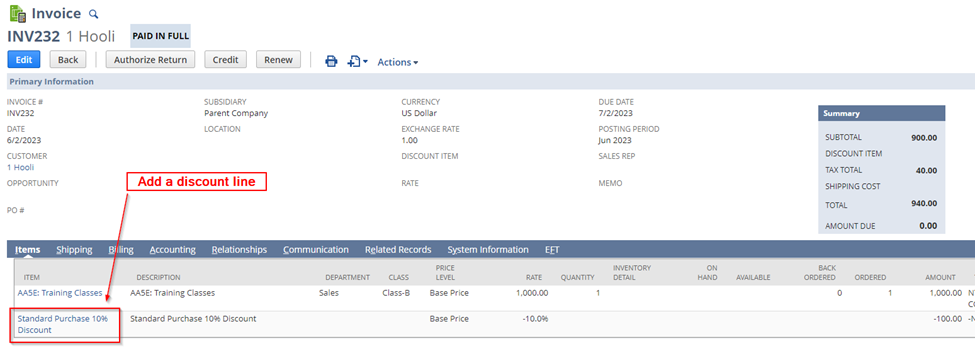
Navigate back to the Sales Order. Approve the Sales Order if necessary. Click “Bill Remaining” to generate the invoice.
Add a discount line to the invoice so the total is less than the customer deposit total. For this example, I added a 10% discount line. Save.
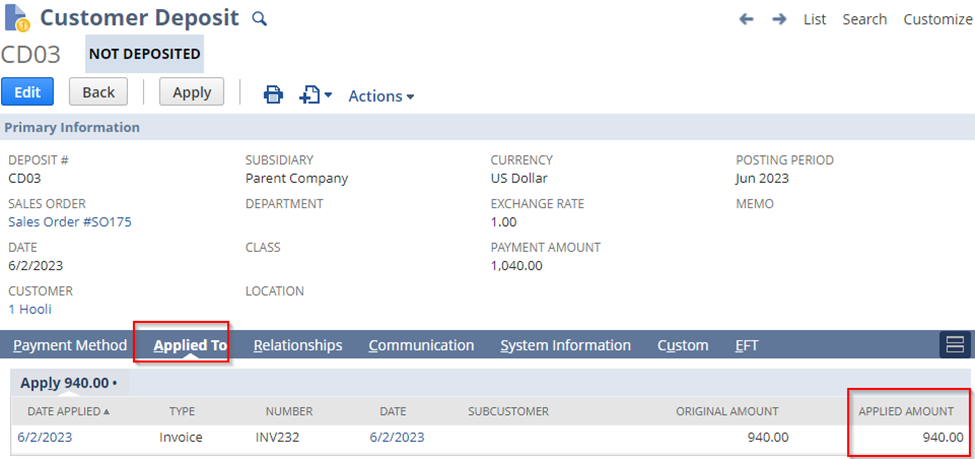
Step 4: Review the Customer Deposit
Navigate back to the Customer Deposit. You can see it is still open. Click on the “Applied To” Tab to see the amount applied to the invoice. The deposit still has $100 that could be consumed (1040 – 940).
Step 5: Create a Journal Entry
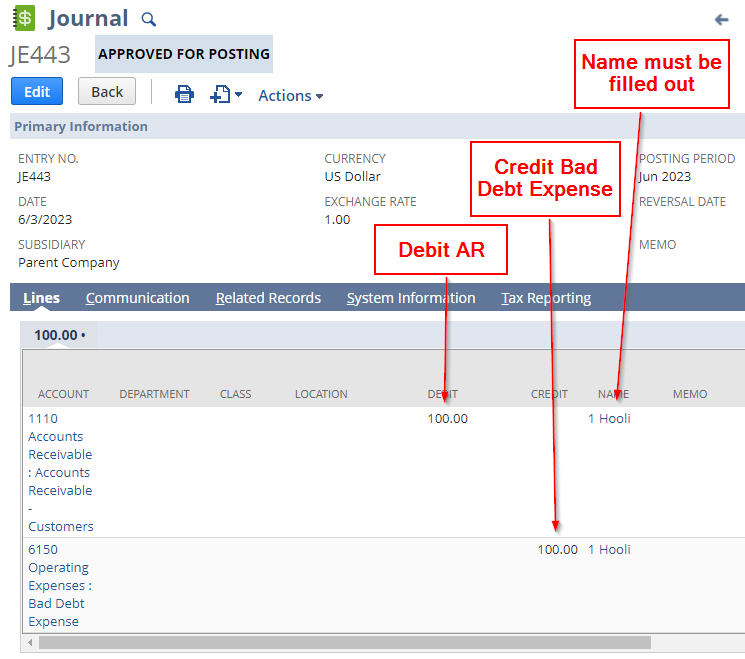
Create a Journal Entry for $100. We will debit the AR account and credit the Bad Debt Expense account. Set the Name field on each line.
Step 6: Apply the Journal Entry to the Customer Deposit
Navigate back to the customer deposit in view mode. Click the “Apply” button.
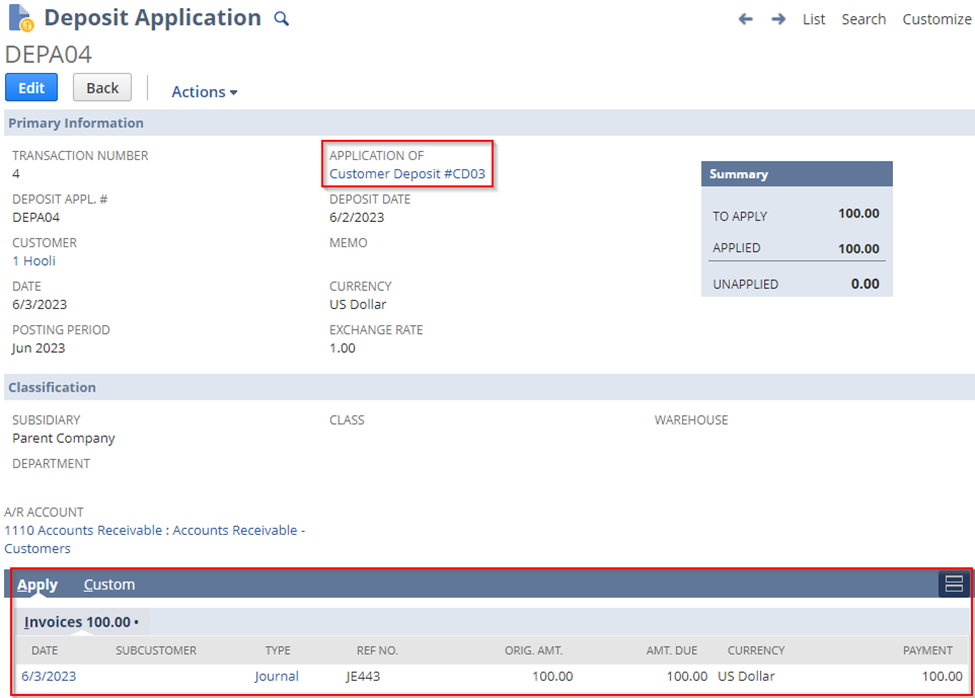
A deposit application record is generated. Click the checkbox next to the Journal Entry which you just created on the invoice sublist. Save the deposit application. After saving, NetSuite redirects you back to the customer deposit record which has been fully applied. Click on the “Applied To” tab to see the journal entry that was applied.
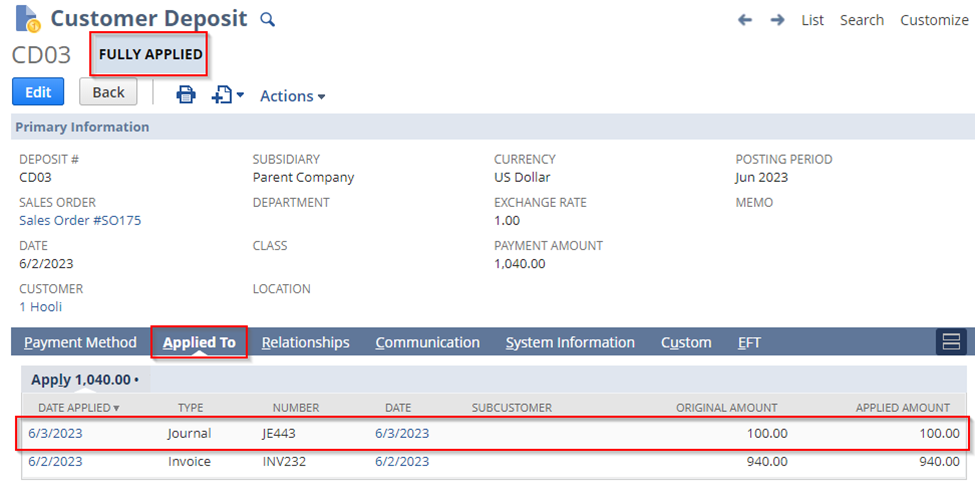
Clicking on the date under “Date Applied” for the Journal will open the deposit application. You can see the journal was applied to the customer deposit.
Step 7: Create a map/reduce script to automate the process
This script takes a list of customer deposits (internal ids) and amounts. It first gets the customer associated with the customer deposit by doing a search. It then creates the journal entry for the amount. Finally, it applies the journal entry to the customer deposit.
You can test the script using my example above. Add and deploy the script (code shown below). Reference my article “Quick Guide to Adding and Deploying a Script in NetSuite” if needed.
					/**
 * @NApiVersion 2.1
 * @NScriptType MapReduceScript
 * @NModuleScope SameAccount
*/
define([ 'N/record', 'N/search'],
(record,search) => {
	getInputData = (context) => {
        log.debug('==START==','==START==');
        // first value is internal id of customer deposit, second value is amount to create journal for
        let customerDepositData = [
            ["22447","100.00"]
        ];
        return customerDepositData;
    }
    map = (context) => {
        log.debug('context', JSON.stringify(context));
        let data = JSON.parse(context.value);
        try {
            let customerDepositData = getCustomerDepositData(data[0]);
            let jeId = createJournalEntry(customerDepositData, parseFloat(data[1]));
            let depositApplicationRecordId = createDepositApplication(jeId, customerDepositData);
            if (!depositApplicationRecordId) {
                // failed to make deposit application so delete the journal entry
                record.delete({
                    type: record.Type.JOURNAL_ENTRY,
                    id: jeId
                });
                log.error('Journal was deleted as deposit application failed for ' + data[0]);
            }
        }
        catch(e) {
            log.error('Error when processing customer deposit ' + data[0], JSON.stringify(e));
        }
    }
    getCustomerDepositData = (internalId) => {
        let searchObj = search.create({
            type: "customerdeposit",
            filters: [
                ["internalid", "is", internalId],
                "AND",
                ["mainline", "is", "T"]
            ],
            columns: [
                "entity"
            ]
        });
        let data = {};
        searchObj.run().each(function (result) {
            data.id = result.id;
            data.entity = result.getValue('entity');
            return true;
        });
        return data;
    }
    createDepositApplication = (jeId, customerDepositData) => {
        try {
            let depositApplicationRecord = record.transform({
                fromType: record.Type.CUSTOMER_DEPOSIT,
                fromId: customerDepositData.id,
                toType: record.Type.DEPOSIT_APPLICATION,
                isDynamic: true
            });
            let lineCount = depositApplicationRecord.getLineCount({sublistId: 'apply'});
            for (let i = 0; i < lineCount; i++) {
                let currentLine = depositApplicationRecord.selectLine({sublistId: 'apply',line: i});
                let testId = depositApplicationRecord.getCurrentSublistValue({sublistId: 'apply',fieldId: 'doc'});
                if (testId == jeId) {
                    depositApplicationRecord.setCurrentSublistValue({sublistId: 'apply',fieldId: 'apply',value: true});
                    depositApplicationRecord.commitLine({sublistId: 'apply'});
                    break;
                }
            }
            let depositApplicationRecordId = depositApplicationRecord.save();
            log.debug('Created deposit application with Id', depositApplicationRecordId);
            return depositApplicationRecordId;
        }
        catch(e) {
            log.error('Failed to create deposit application', JSON.stringify(e));
        }
        return false;
    }
    createJournalEntry = (customerDepositData, amount) => {
        let accounts = {
            'ar_account' : 6,
            'bad_debt_account' : 63
        };
        let jeRecord = record.create({
            type: 'journalentry',
            isDynamic: true
        });
        jeRecord.setValue('subsidiary', 1);
        // add debit
        let lineNum = jeRecord.selectNewLine({sublistId: 'line'});
        jeRecord.setCurrentSublistValue({sublistId: 'line',fieldId: 'account',value: accounts.ar_account});
        jeRecord.setCurrentSublistValue({sublistId: 'line',fieldId: 'debit',value: amount});
        jeRecord.setCurrentSublistValue({sublistId: 'line',fieldId: 'entity',value: customerDepositData.entity});
        jeRecord.commitLine({sublistId: 'line'});
        // add credit
        let lineNum = jeRecord.selectNewLine({sublistId: 'line'});
        jeRecord.setCurrentSublistValue({sublistId: 'line',fieldId: 'account',value: accounts.bad_debt_account});
        jeRecord.setCurrentSublistValue({sublistId: 'line',fieldId: 'credit',value: amount});
        jeRecord.setCurrentSublistValue({sublistId: 'line',fieldId: 'entity',value: customerDepositData.entity});
        jeRecord.commitLine({sublistId: 'line'});
        let recordId = jeRecord.save();
        log.debug('Created journal with Id', recordId);
        return recordId;
    }
    summarize = (summary) => {
        log.debug('==END==','==END==');
    }
    return {
        getInputData: getInputData,
        map: map,
        summarize: summarize
    };
});
Conclusion
If you have many customer deposits to clean up, this script will get it done fast.